
7 HMI Types Compared: Pick the Right One in 2026
Choosing between HMI types is tougher than it seems and picking the wrong one can cost more than the screen itself. Picture a display installed in a hot dusty, sun‑lit factory. Within months the touch slows the screen blazes and operators lose confidence. Many online lists make the decision harder, by mixing hardware, software and screen features.
This guide explains what an HMI is, compares seven HMI types by how they’re built and used and shows you how to pick one. You will also find a checklist you can use on your own site.
What Is an HMI? Full Form and Meaning in Simple Words
The HMI full form is Human-Machine Interface. Some old books and manuals call it a man machine interface. The meaning is the same. The HMI is the screen or panel where a person sees what a machine is doing. Tell the HMI what to do next.
Think of a car dashboard. The speedometer shows the state. The steering wheel and pedals take your commands. A warning light tells you when something is wrong. The HMI does the job for pumps, motors, conveyors and whole production lines.
In terms every HMI does three jobs: HMI shows the status of the process, HMI takes commands from the operator and HMI raises alarms when something goes wrong. HMI sits between the operator and the controller, such as a logic controller (PLC) which actually runs the machine. If you want to go into the building blocks read our guide to HMI components.
HMI, PLC and SCADA: How They Work Together
These three terms get mixed up often. Here is a simple way to differentiate them. PLC is the brain of a machine. PLC reads sensors following its program and switches motors, valves and pumps on or off. HMI is the face of the system. HMI shows PLC data to the operator. Passes the operator’s commands back. SCADA is the view. SCADA collects data from PLCs and HMIs across a plant or several sites and keeps a record of it. A small machine may need PLC and HMI. A large plant often uses PLC, HMI and SCADA together. Knowing this difference makes it easier to choose the HMI type later in this guide.
Why Choosing the Right HMI Type Matters
An HMI is not a screen. It is the way your team communicates with the machines. When the HMI type does not fit the site problems appear quickly. Operators read values incorrectly because of glare or a slow touch response. Screens break early in heat, dust or moisture which leads to downtime and repeated costs. A missing button or a bad alarm display can make it harder for people to respond when something goes wrong.
The right HMI type does the opposite. It provides readings even in bright light, works longer in tough conditions and helps operators respond faster and with more confidence. It also reduces long-term costs because you buy units and fix fewer issues. The sections below compare seven HMI types so you can see which one works best for your site.
7 HMI Types Compared
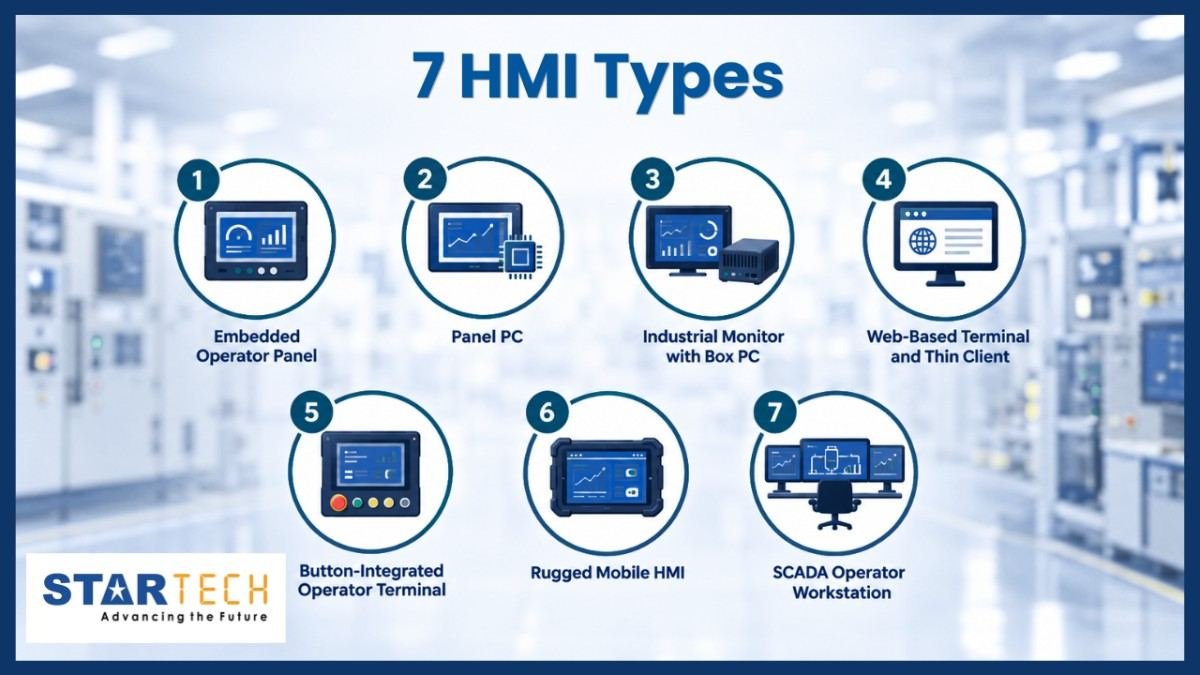
There is no one list of HMI types and different companies organize them in different ways. In this guide we organize them based on how they’re made and how they are used. This helps keep the comparison simple and stops mixing hardware with software. The sections below explain each type.
1. Embedded Operator Panel
An embedded operator panel is a touchscreen designed only to run an HMI application. It usually has a processor and basic software so it starts fast and requires very little maintenance. You will find it on packaging machines, pump skids and small production cells. Its main advantage is simplicity and low cost. Its main disadvantage is processing power so it has trouble with large data logging or complicated graphics. Startech lists operator panels from Advantech, whose newer WOP-300K series for example has dual Ethernet ports.
Typical scenario: a machine builder needs one screen to start, stop and monitor a single filling machine.
2. Panel PC
A panel PC is a computer built into the back of a touchscreen. Panel PC runs Windows or Linux so panel PC can handle graphics, data logging and several applications at once. Plants use panel PCs in control rooms on production lines and in machine cabinets. Panel PC strength is flexibility because panel PC can install any HMI or SCADA software. Panel PC limit is cost and upkeep since an operating system needs updates and security care. Startech lists a range of touch panel PC options for these jobs.
Typical scenario: a bottling line needs production charts, recipe storage and a link to the factory network.
3. Industrial Monitor with Box PC
Here the display and the computer are separate. An industrial monitor shows the screen, and a small box PC in a cabinet does the thinking. This is common in control rooms and in plants where the computer must stay in a cool, clean place. The strength is that you can replace or upgrade the display or the computer on its own. The limit is extra parts and cabling. Advantech also offers a modular HMI series built on this idea, with computing boxes and display kits. Startech lists industrial monitors from Advantech and Red Lion.
Typical scenario: a water plant keeps its computers in an air-conditioned room and runs touch monitors out to the pump hall.
4. Web-Based Terminal and Thin Client
A web‑based terminal displays an HMI screen that actually runs on a server. The web‑based terminal itself is a fanless device that has a screen and a browser. Because the software lives on the server, when you update it in one place the web‑based terminal shows the version on every screen. This is useful for places that have screens, such as large plants and pumping networks. The drawback is that the web‑based terminal needs a network and a reliable server.
Typical scenario: a utility wants the same dashboard on twenty screens across several sites.
5. Button-Integrated Operator Terminal
Some jobs need buttons, not just a touchscreen. A button‑integrated places physical controls like start stop or emergency stop right in the same unit as the screen. Operators can push button‑integrated controls while wearing gloves and without looking. Button‑Integrated Operator Terminal helps on machines where speed and safety’re important. The limit of Button‑Integrated Operator Terminal is a fixed layout because the buttons cannot be easily changed after installation.
Typical scenario: a press operator needs a hard stop button right next to the screen that shows machine status.
6. Rugged Mobile HMI
Typical scenario: a maintenance team walks a large site and checks equipment readings on a tablet.
7. SCADA Operator Workstation
A SCADA operator workstation is a computer that displays a plant, not just one machine. SCADA stands for control and data acquisition. The SCADA operator workstation collects data from controllers, displays trends and alarms and keeps a history record. The SCADA operator workstation is found in control rooms at water plants, power stations and pipelines. The SCADA operator workstation’s strength is its full‑site view. The SCADA operator workstation’s limitation is that it requires trained staff and careful security measures.
Typical scenario: an operator watches ten pumping stations from one control room.
How to Choose the Right HMI Type: A Quick Decision Framework
Answer these four questions before you compare models. Your answers will usually point to one or two HMI types.
1. Where will it be installed?
Inside in a room outside in strong sun in a dusty area or in a washdown zone? Tough places need a sealed unit. An IP65 rating for example means the front is dust tight and protected against water jets. Outside look for a sunlight readable screen.
2. Who will use it?
Operators wearing gloves need either buttons or a touchscreen that works with gloves. Many users on screens suggest a web based terminal.
3. What must it connect to and how securely?
Check that the HMI supports your controllers protocols which’re the languages devices use to talk to each other. If it will be reached remotely, plan access control and regular updates from the start.
4. What are your budget and support needs?
Think about the cost over the years including spare units, software updates and local support not only the purchase price.
A word on touch technology. Resistive screens react to pressure, so they work with gloves or a stylus. Capacitive screens react to the electric charge of a finger, give a clearer picture and support multi-touch, but may not respond to thick gloves or water on the screen. If you can, test both with your own operators. For a wider look at the panels available in the UAE, see our industrial touch screen panel guide.
Two exceptions require more attention. When there are risks of explosion due to presence of gases or dust, consider HMIs that meet the requirements according to ATEX, IECEx or Class I Division 2. Advantech offers its explosion-proof series which has relevant certification. If an HMI is going to be used outdoors, opt for a high-brightness, sunlight-viewable display.
Checklist before purchase:
- Installation location and IP rating
- Operating temperature range and screen brightness
- Touch technology compatible with operators
- Supported protocols and your controller manufacturer
- Certifications for hazardous environments
- Remote connection and security policy
- Availability of spare parts and service
Make sure that all ratings are verified in the datasheet provided by the vendor.
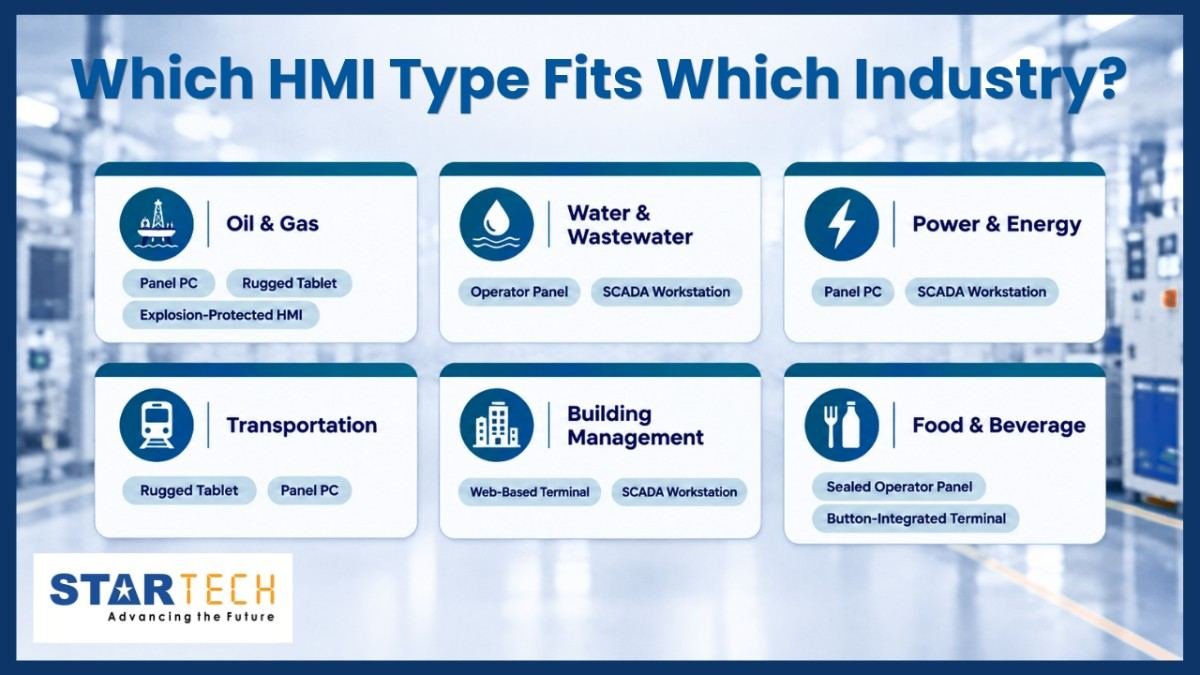
Which HMI Type Fits Which Industry?
| Industry | Best-fit HMI types and why |
|---|---|
| Oil & gas | Panel PC, rugged tablet, explosion-protected HMI: built for heat, dust and hazardous areas. |
| Water & wastewater | Operator panel at each station, SCADA workstation in the control room: small panels run each pump, and one workstation watches all stations. |
| Power & energy | Panel PC, SCADA workstation: reliable alarms, trends and history for the whole plant. |
| Transportation | Rugged tablet, panel PC: handles vibration and mobile use. |
| Building management | Web-based terminal, SCADA workstation: many screens managed from one place. |
| Food & beverage | Sealed operator panel, button-integrated terminal: easy to wash down and works with gloved hands. |
A Typical Scenario: Choosing an HMI Type on a GCC Site
This is an example, not an actual client project. Imagine a water treatment plant located in the Gulf. The pumps are placed outside in the summer where the weather is very hot. There is a lot of dust. The team initially installs office-quality monitors in the pump area. After one season the bright sunlight makes it hard to see the display and the screens get too hot.
Using the four questions mentioned earlier the team realizes that the outdoor areas need a sealed sunlight- operator panel. The control room is better suited for a SCADA workstation with monitors. They also include a tablet for checking the equipment during inspections.
The expected outcome is visibility, fewer problems and less time when the system is not working. The main idea is clear: choose the HMI type that fits the location not the way around. There is no one type of HMI, for every place.
Conclusion
Choosing among HMI types does not need to be hard. Each type is built for a different job: embedded panels for single machines, panel PCs for heavy data, monitors with box PCs for control rooms, web terminals for many screens, button terminals for hands-on control, rugged tablets for field work and SCADA workstations for whole plants. No type is best everywhere. Your site conditions, your operators and your connection needs should decide. Before you buy, run your project through the checklist above and confirm every rating on the datasheet.
If you are unsure, talk to the Startech team. Since 2002, Startech has supplied industrial computing and automation products across Bahrain, Kuwait, Oman, Qatar, Saudi Arabia and the UAE. Our engineers can help you compare options and match them to your site. You can also browse our operator panel, panel PC and industrial monitor pages to see what is available. Contact Startech today to discuss your next HMI project.
FAQ
1. What is the full form of HMI, and is it the same as a man machine interface?
HMI stands for Human‑Machine Interface. The older term man‑machine interface refers to the thing. Both HMI and man‑machine interfaces describe the screen or panel that an operator uses to watch over and control a machine.
2. How many HMI types are there?
There is no official count for HMI types. Brands group them in ways. In this guide HMI types are grouped into seven categories based on how they’re built and used, ranging from embedded operator panels to SCADA workstations.
3. Which is better for industrial use: resistive or capacitive touchscreen?
The best choice between capacitive touchscreen depends on operators and the site. Resistive screens work well with gloves and a stylus. Are often cheaper. Capacitive screens offer a picture and support multi‑touch but they may have trouble with thick gloves or water.
4. What is the difference between an HMI and SCADA?
An HMI normally serves one machine or work cell. SCADA covers a plant or several sites gather ing data from many controllers and keeping a history of that data.
5. Can an HMI be used outdoors in extreme heat?
An HMI can be used outdoors in heat if it is built for that purpose. Look for a sunlight‑readable screen, a sealed enclosure and an extended temperature range. Always check the ratings on the datasheet.